Pair grafli with your AI
grafli isn't just a diagram editor — it's the canvas your coding agent
uses to communicate complex systems back to you. A .grafli file
is plain text, line-oriented, and small enough that an LLM can read,
modify, and produce it in seconds. The bundled grafli skill
teaches the agent how to do that well.
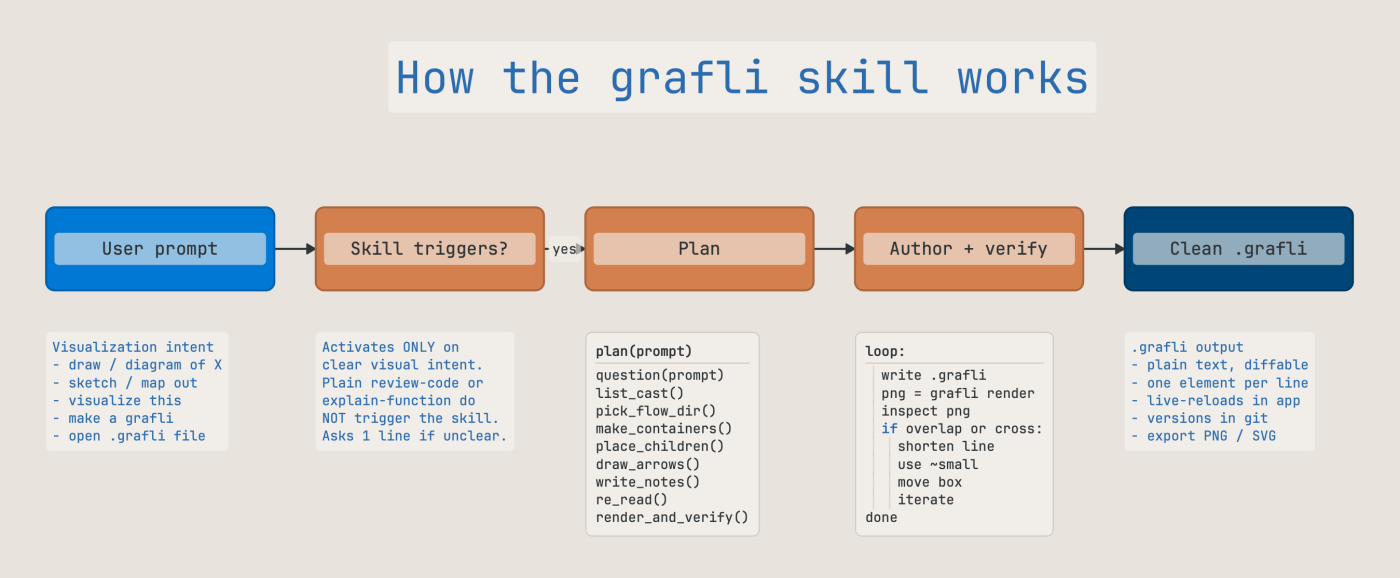
The diagram above is itself a .grafli (examples/skill-explained.grafli)
authored under the same skill it describes — meta-correct, and a small
demonstration that the workflow holds.
Why a skill is needed
Without guidance, a generic LLM will invent broken .grafli syntax,
fight the renderer's layout model, and produce diagrams that look
plausible in the conversation but render as overlapping boxes and
crossed arrows in the actual app.
The skill gives the agent:
- A planning loop — "what question does the diagram answer?" before any boxes get placed, so the diagram has a point.
- Layout discipline — grid alignment, container margin model, flow direction, fan-out handling, the typography scale, and the zoomed-out (semantic-zoom) reading as a second thing to author.
- Collaboration etiquette — working
T:/Q:notes on a shared board, minimal diffs, proposals instead of unilateral restructuring. - Code-mode authoring style — predicate-style names, contract keywords for review focus, when to use a code-block versus split the logic into multiple nodes.
- Presentation authoring — flows, scoped stops, text slides, container-as-slide composition, PDF/PPTX export incl. templates.
- Thinking-board patterns — decision boards, tension maps, question landscapes, and the deliberate-incompleteness rules that keep the board a tool for your thinking.
- Common-mistakes checklist — quote escaping, disconnected nodes, truncated labels, deprecated keywords. The things that recur.
It's structured as a lean, always-loaded core (SKILL.md — triggers,
workflow, etiquette, checklist) plus references/ files the agent
reads on demand (full format tables, design principles, presenting,
thinking boards) — deep coverage without a heavyweight prompt.
Install
The skill ships inside the Python package as a directory —
SKILL.md plus its references/ files. The built-in installer places
it where your AI tool expects skills:
# Install for one or all supported tools (copies SKILL.md + references/)
grafli skill install claude
grafli skill install all

# Report install status per tool (and whether a newer version shipped)
grafli skill check

# Single-file consumers: stdout is the FULL skill, references inlined
grafli skill -o GRAFLI-SKILL.md
grafli skill --core          # just the lean core, no references

# Print the path of the bundled skill directory (so you can symlink it)
grafli skill --where
| AI tool | Where the skill goes | Docs |
|---|---|---|
| Claude Code | ~/.claude/skills/grafli/ (or per-project under .claude/skills/...) |
https://code.claude.com/docs/en/skills |
| Codex | ~/.agents/skills/grafli/ |
https://developers.openai.com/codex/skills |
| OpenCode | ~/.config/opencode/skills/grafli/ (also reads the claude/codex paths) |
https://opencode.ai/docs/skills |
grafli skill check compares the installed version against the
packaged one, so re-running grafli skill install after
pip install --upgrade grafli keeps agents on the latest skill. A
symlink to grafli skill --where works too if your platform supports
it comfortably.
What the skill triggers on
The skill is deliberately scoped narrowly to avoid polluting unrelated conversations. It activates on explicit visualization requests — phrases like:
- "draw a diagram of …"
- "visualize the …"
- "sketch / map out / graph this"
- "make a grafli for …"
- working on existing
.graflifiles
It also activates when you ask the agent to explain, walk through, or present an existing graph — it authors a flow: an ordered sequence of saved viewpoints with narration, so a big diagram is taught as a guided tour (playable in-app, presentable fullscreen, exportable to PDF / PPTX slides) instead of dumped all at once.
And it activates on thinking-board requests — "help me think through X", "weigh the options", "map out the unknowns" — the moments a human explainer would walk to a whiteboard. The agent then authors a board that structures the problem (a decision board, a tension map, a question landscape) rather than one that documents a system.
It does not activate on generic "review this code", "explain this function", or "summarize this module" requests unless the user also asks for a visual, a board, or a diagram. Keeping the trigger tight keeps your agent fast and focused on the task at hand.
A typical session
Once the skill is installed, the agent:
- Listens for a visualization request.
- Asks any clarifying question (the planning loop).
- Produces a
.graflifile usingWrite. - Verifies its own work headlessly:
grafli render(with--focus,--lod, and--bookmarkfor targeted looks),grafli diagnose(incl.parse-errorfindings for lines that would silently drop),grafli inspectfor placement geometry, andgrafli export --checkwhen a deck is involved.grafli diagnose --fixapplies the mechanical corrections (clamping, sizing, mistyped tokens) and exits non-zero while errors remain, so the loop can run unattended — what needs a judgment call is left for the agent to decide. - Iterates on the layout / labels based on feedback.
The agent's output is just text. You can edit it, diff it, version it, and re-render any time. There is no proprietary format or cloud service in the loop.
Render-on-demand for your CI
Because grafli render is a non-interactive subcommand, your CI can
re-render diagrams on every push:
Pair this with a markdown reference to the SVG and the diagram in your design doc stays in sync with the source — the same workflow as docs-as-code, but for system pictures.
Combining the skill with code-mode notes
The skill encourages graph + code-mode as the default pattern for review-oriented diagrams: the graph carries who calls whom, while each box has a 5–9 line code-mode note describing what one function does. Together they answer questions neither could answer alone:
- Where could an open redirect hide? (graph locates the box, code
note shows the
riskline.) - What contracts are covered by tests? (
verify:arrows from a tests box mirror theverify:lines inside each code-mode note.) - What's the failure mode of this saga? (each
pre/post/riskcontract is visible at a glance.)
This pattern is the headline differentiator versus generic diagram tools — and the skill is what gets your agent to produce it cleanly from a one-line prompt.